Common User Directory Settings
This page covers settings that apply to every user directory type, regardless of protocol.
Display options
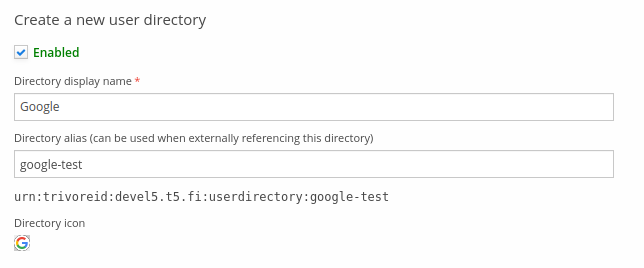
At the top of the user directory editor are display options for the directory:
- Enabled — enables or disables the directory; a disabled directory can't be used to sign in. When enabled, the Enabled label is shown in green.
- Directory display name — the name shown when a user is selecting which directory to sign in with.
- Directory alias — a unique identifier (per Trivore ID instance) that external apps can
use to direct sign-in straight to this directory. Once set, the full URN for referencing this
directory is shown; use it as the OpenID Connect
acr_valuesquery parameter to automatically redirect a user to this directory's sign-in (see Advanced features). - Directory icon — a small icon shown next to the directory's display name. Custom icons can be uploaded, up to 2 MB.
Namespaces where this user directory is available
A user directory can be made available for sign-in in more than one namespace. Use Add to add a namespace to the list; users in any listed namespace can sign in through this directory. One namespace can be marked primary using the star icon (Make primary).
Login translations
To customise the login button/selection text shown to users for this directory, use the Login translations tab.

Login captions can be added per language/locale — select Add and choose the language and (optionally) country. In most cases, selecting only the language and leaving the country unselected is enough, unless you specifically need different translations for regional variants (for example British vs. American English).
Login descriptions aren't currently used, but may be used in the future to show additional details about the directory.
User information
Most of the attribute mappings below are available for every supported directory type — ignore any that don't apply to the type you're configuring, since default values differ between types.
Each field's name describes the Trivore ID attribute the imported value is stored in; its value
should be the corresponding attribute name in the external directory. For example, Link ID is
most commonly sub for OpenID Connect based directories (id for Azure AD instead). Mapping
fields can take multiple values in order of preference, comma-separated. Each mapping gets a
sensible default value where it's possible to import one from a given directory type.
| Field | Description | Default value | Example attribute value |
|---|---|---|---|
| Allow creating new users | Allow or deny creating new users. Check this if every user from the directory should be able to sign in to Trivore ID; if unchecked, only existing users can link their account to this directory. | False (not checked) | N/A |
| Link ID (required) | A permanent, non-secret user identifier from the external directory, used to identify the user — an attribute whose value never changes for that user, such as sub or id. If the value ever changes, a new user account is created, since the system can no longer detect the correct link. | Depends on directory | "5f84b3104cb0aa70df369e26" |
| Encrypt Link ID using salted hash algorithm | Encrypts the Link ID above. Needed if Link ID values contain sensitive information, such as a social security number. | False (not checked) | N/A |
| How to handle conflicts with archived users | Action to take when a sign-in conflicts with an archived user. Either deny the sign-in as a conflict, or reactivate the existing account and replace it with the new user information. | Existing archived user causes conflict; sign-in is not possible | N/A |
| Allow users to change password | Allow signing in to Trivore ID with a username and password, in addition to this directory. If unchecked, users linked to this directory can only sign in through it, since they're never able to set a Trivore ID password. | False (not checked) | N/A |
| Username import policy | How to handle usernames in Trivore ID, to guarantee username uniqueness within a namespace. Usernames can be imported from the external directory, but generating them automatically via the namespace's default settings is preferred. | Automatic namespace username policy (actual value depends on the namespace's configured policy) | N/A |
| Username | The external directory attribute providing the user's username. Only available when using the manual attribute selection username policy. | Depends on directory | [email protected] |
| Username prefix | A literal prefix added to the username. Only shown when the "Manual attribute selection with prefix" username import policy is selected. | None | N/A |
| Username suffix | A literal suffix added to the username. Only shown when the "Manual attribute selection with suffix" username import policy is selected. | None | N/A |
| Update username if it does not match given settings | Update the user's username on every successful sign-in if it no longer matches the configured settings. Only happens when signing in via the user's primary directory. | False (not checked) | N/A |
| Friendly name | A friendly name for the user's external directory account, to help them identify it — useful if users manage their own account links. Shown in the Dashboard panel's Account column and in the manage-directory-links dialogue. | Depends on directory | "John Doe" |
| First name | The external directory attribute providing the user's first name. Only imported from the primary directory. | Depends on directory | "John" |
| Last name | The external directory attribute providing the user's last name. Only imported from the primary directory. | Depends on directory | "Doe" |
| Full name | The external directory attribute providing the user's full name (first, last, and any middle names). Only useful when separate first/last name attributes aren't available; only imported from the primary directory. | Depends on directory | "John Doe" |
| The external directory attribute providing the user's email address. | Depends on directory | "[email protected]" | |
| Email verified | The external directory attribute providing the user's email verification status (boolean). | Depends on directory | true |
| Mobile | The external directory attribute providing the user's mobile number. | Depends on directory | +358401234567 |
| Mobile verified | The external directory attribute providing the user's mobile number verification status (boolean). | Depends on directory | false |
| Locale / language | The external directory attribute providing the user's language or locale. | Depends on directory | "en_US" or "en" |
| Photo URL | The external directory attribute providing the user's photo URL. Implementation varies between directory types. | Depends on directory | "https://graph.example.com/<userid>" |
| Date of birth | The external directory attribute providing the user's date of birth. | Depends on directory | "2000-01-31" |
| Update user minor information based on birthdate | Recalculate whether the user is a minor on every sign-in, based on the imported date of birth. | False (not checked) | N/A |
| Nationality | The external directory attribute providing the user's nationality. | Depends on directory | "FI" |
| Organisation | The external directory attribute providing the user's organisation. | Depends on directory | "Example Corp" |
Additional custom field mappings
In addition to the built-in attributes above, arbitrary values from the external directory can be imported into custom fields. Add a row per external attribute:
- Additional attribute names — a comma-separated list of attribute names in the external user directory to import.
- Target custom field name — the custom field the value is stored in.
- Storage format — whether only the first matching value is imported (stored as a single string), or all matching values are imported (stored as an array of strings).
Group information
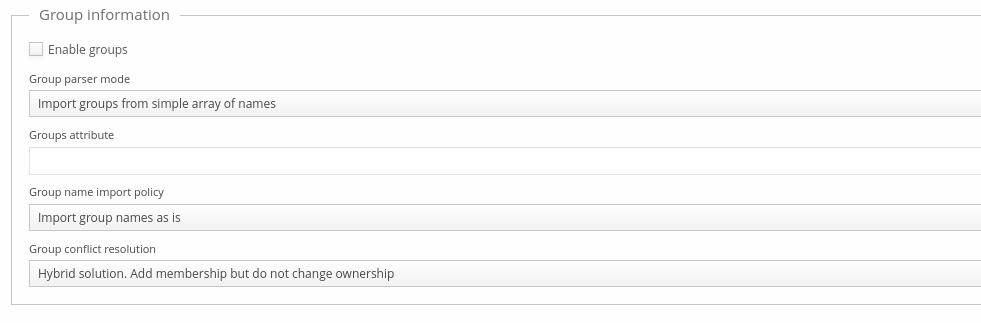
Group parser mode is only available for OpenID Connect and other JSON-based directories — SAML-based directories can't represent complex data structures, so they only support a flat list of group names.
| Field | Description | Default value |
|---|---|---|
| Enable groups | Enable or disable importing groups from the directory. | False (not checked) |
| Group parser mode | Groups can be parsed from a simple array of name strings, or an array of JSON objects with id, name, and description attributes. | Import groups from a simple array of names |
| Group attribute | The name of the attribute to import groups from. | None |
| Group name import policy | Group names can be imported as-is, or with an additional literal prefix or suffix. | Import group names as-is |
| Group conflict resolution | How conflicts with existing Trivore ID groups are handled — see below. | Hybrid: add membership, but don't change ownership |
Example, groups as an array of names:
{
  "groups": ["first group", "second group"]
}
Example, groups as an array of objects:
{
  "groups": [
    {"id": "1234", "name": "group 1", "description": "descr 1"},
    {"id": "5678", "name": "group 2", "description": "descr 2"}
  ]
}
The Group conflict resolution options:
- Override policy, add membership and make this directory owner of the group — membership is added even to a group not owned by this directory (for example, one created manually or imported from another directory). This directory becomes the group's owner. Best when you don't expect conflicts between user directories, only with manually-created groups — it correctly removes Trivore ID membership when membership is removed in the external directory.
- Ignore any conflicting groups (do not add membership) — membership is not added to a pre-existing group this directory doesn't own.
- Hybrid solution: add membership but do not change ownership — membership is always added, even to a group this directory doesn't own, but ownership isn't changed. The downside: Trivore ID membership in a conflicting group isn't removed when membership is removed externally.
Group import filters
Group import filters define which groups are imported based on their names. If no filters are defined, all groups are imported; otherwise, only groups whose name matches any of the filters are imported. Group name patterns support wildcards.
Add a filter with Add, giving it a group name pattern and optionally a description; filters can be individually enabled or disabled via their Status.
Employee information
Enable Employee information to import employer-related attributes for the user, in addition to the personal attributes above:
| Field | Description |
|---|---|
| Employee country | The external directory attribute providing the country the user is employed in. |
| Organisation | The external directory attribute providing the user's employer organisation. |
| Department | The external directory attribute providing the user's department. |
| Employee number | The external directory attribute providing the user's employee number. |
| Job title | The external directory attribute providing the user's job title. |
Attribute mapper
The attribute mapper supports dot-separated syntax for JSON data structures. For example, given:
"onPremisesExtensionAttributes": {
    "extensionAttribute1": "value1",
    "extensionAttribute2": "value2"
    ...
    "extensionAttribute15": "value15"
}
these extension attributes can be referenced as onPremisesExtensionAttributes.extensionAttribute1
and onPremisesExtensionAttributes.extensionAttribute2.