Getting Started
The content of the Main Menu is dynamic — it depends on the roles and permissions a user account holds, and on which services are activated for the namespace. Dashboard is the only item guaranteed to be available to every user account; everything else is shown or hidden based on role.
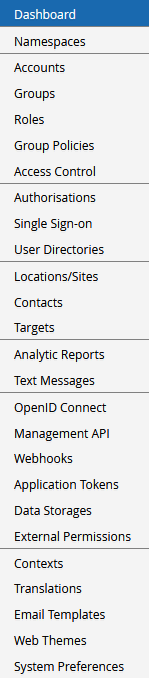
The exact set of items varies by deployment and by account. Most Main Menu items are documented on their own page elsewhere in Management, organised by topic; this section covers general orientation in the UI, plus a reference for items that don't have a dedicated page of their own.
In this section
| Page | Description |
|---|---|
| Navigating the UI | Overview of the screen layout: Top Bar, Main Menu, Personal Menu, and Main Pane |
| Dashboard | Overview of system state, and a hub of self-service shortcuts |
| Other Main Menu Items | Reference for every Main Menu item without its own dedicated page |