Advanced Features
These are some advanced features and configuration capabilities available on Trivore ID for user directories.
Linking multiple user directories to a single Trivore ID user account
This is a fairly common need in enterprises, where a person may have user accounts in multiple external directories, such as Azure AD or Google Workspace. Here we show how those external accounts can be consolidated into a single identity on Trivore ID.
As a bonus, single sign-on (SSO) then works flawlessly across them, and the user's Trivore ID identity can at any time be enriched with a higher level of assurance (LoA) using suomi.fi-tunnistus or other means.
End users themselves can link their Trivore ID user account with multiple external user directory accounts, using the Dashboard panel option Link my account with another account.
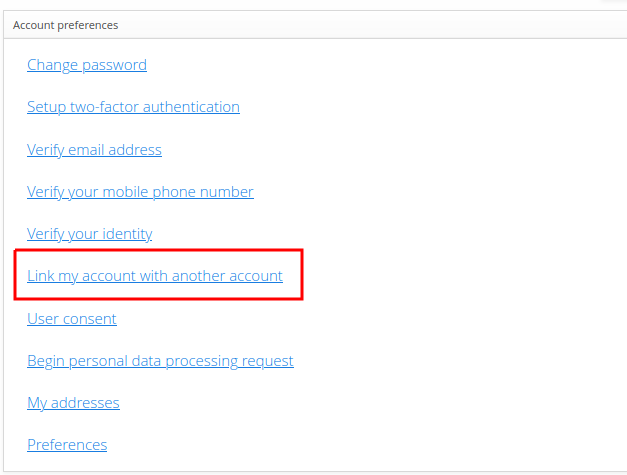
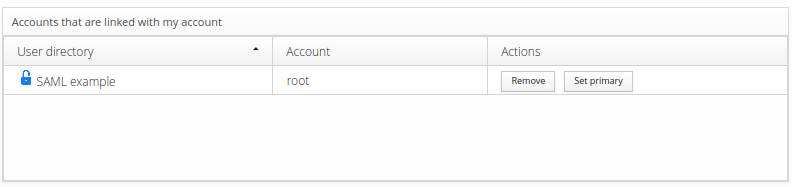
Only one link can be primary at any given time. Primary links are used to update certain single-value attributes such as first and last name. A primary link can also be unset, which means Trivore ID itself becomes the master data source for that user account.
End users manage their own user directory links from the same Dashboard panel:
Creating user accounts on-demand via suomi.fi-tunnistus
In this use case, user accounts are created in a namespace dynamically, the moment a person signs in to Trivore ID using a suomi.fi-tunnistus user directory. The user directory requires a specific configuration for this to work; the key settings are:
- Select Link user with directory.
- Select Allow creating new users.
- Set Link ID to
urn:oid:1.2.246.21. - Select Encrypt Link ID using salted hash algorithm.
- Set How to handle conflicts with archived users to reactivate the existing account and replace it with the new user information.
Automatic redirect to user directory on OpenID sign-in
When a user is directed to Trivore ID's OpenID Connect authentication, you can have them
automatically redirected straight to the external user directory's own authentication, bypassing
the Trivore ID sign-in entry screen entirely, by adding the acr_values query parameter.
The value of acr_values is the user directory's full URN, available once you've defined an
Alias for it, in the format urn:trivoreid:{DOMAIN}:userdirectory:{ALIAS}.
For example:
GET /openid/auth?client_id=0000&{other parameters}&acr_values=urn:trivoreid:id.example.com:userdirectory:example-directory
Remember to URL-encode special characters in the URN value if necessary — the example value
above encodes to urn%3Atrivoreid%3Aid.example.com%3Auserdirectory%3Aexample-directory. Replace
id.example.com with your own ID hostname.
When validating the id_token, ensure its acr claim contains the exact same value that was
used in the acr_values query parameter. This confirms that authentication happened via that
specific user directory, and that the user didn't manipulate the authentication request
parameters — critical especially when not using signed authentication requests.