Trivore ID
Trivore ID (formerly Trivore Identity Service, previously known as onePortal) is an Identity Provider and Identity and Access Management (IAM) platform — and a foundation for building the applications and services that depend on identity, access control, and related business capabilities. It's multi-tenant from the ground up, so a single deployment can serve many organisations at once, each in its own isolated namespace.
This Introduction section covers Trivore ID's concepts and features. For day-to-day administration — configuring namespaces, users, and integrations — see Management; for building your own applications and integrations, see Developer Guide.
What you can do with Trivore ID
| Feature | What it gives you |
|---|---|
| User Management | Accounts, groups, and Group Policies — the building blocks for managing who your users are, and what applies to them. |
| Single Sign-On | A certified OpenID Connect provider, plus distributed SSO that signs users into every connected service at once. |
| Access Management | Role-based permissions and fine-grained access control lists, so users and API clients only ever see what they should. |
| User Directories | Federate sign-in from Azure AD, SAML, LDAP, Suomi.fi, and more — or run Trivore ID's own built-in LDAP server. |
| Multi-Factor Authentication & Passkeys | TOTP, SMS, and passwordless passkey sign-in, enforceable per namespace or group. |
| Optional Modules | Extend the platform — aggregate personal data across back-end systems with MyData, or sync Finland's DVV population registry. |
| Management & Developer APIs | A full REST Management API, and OpenID Connect/OAuth 2.0 endpoints, for building on top of Trivore ID. |
In this section
| Page | Description |
|---|---|
| User Management | Account types and lifecycle, groups, group policies, invites, and strong identification |
| OpenID Connect | What OIDC is, single sign-on/sign-out, new user registration, and communication method verification during authentication |
| Access Management | Role-based access control and entity-level access control lists |
| Optional Modules | Add-on capabilities available on request, such as MyData and the Finnish DVV population registry integration |
| FAQ | Answers to common questions, such as when to use Custom Fields instead of a built-in User field |
| Release Notes | What's new in each Trivore ID version, and what to check before upgrading |
Important addresses
If you're new to Trivore ID, these are the addresses you'll need most:
- Documentation site: https://trivoreid.com
- API reference on your deployment:
https://{your-id-server}/apidoc - Management UI:
https://{your-id-server}/ui
This documentation is an introduction to Trivore ID's features and concepts — it doesn't include every field-level detail for every view. In the Management UI itself, hovering over a field label or a nearby information icon often reveals additional contextual help.
Architectural overview
Trivore ID is more than an Identity Provider (IdP) or IAM product — it's also a platform for building external applications and services that rely on identity, access control, and related business capabilities.
Main elements
Trivore ID core
Trivore ID Core includes identity management, framework components, application logic, database, web server, LDAP server, and the management web UI. It's delivered as an installable software product.
Key platform characteristics include:
- Multi-tenancy (namespaces)
- Strong identification and modern authentication options
- Fine-grained role and permission model
- Audit trail and compliance-oriented controls
- Flexible object and data model
- REST APIs and UI-based administration
Trivore ID framework
The platform can also be used as a web application framework for custom solutions in sectors such as healthcare, public services, and enterprise platforms.
Multitenancy
Trivore ID is multitenant: many organisations can use the same platform safely and independently through isolated namespaces.
Because features and permissions can differ by namespace and role, users may see different functions and UI views depending on their scope.
OpenID Connect provider
Trivore ID includes an OpenID Certified OpenID Connect Provider.
Management UI
Management UI (historically "onePortal") is used to manage tenants, namespaces, users, roles, groups, integrations, and configuration. It's the central operations UI for administrators.
Self-service UI
Self-service UI enables end users to manage their own account and profile data. Source code can be provided to customers for customization use cases.
Management API
Management API is a REST API used by external applications and OAuth 2.0 clients to integrate with Trivore ID.
See API Guide for full details.
External user directories
Trivore ID supports identity federation and integration with external user directories, including OpenID Connect, SAML, LDAP-based, and social login providers.
See User Directories for the full list of supported types and configuration details.
Logical structure and extensions
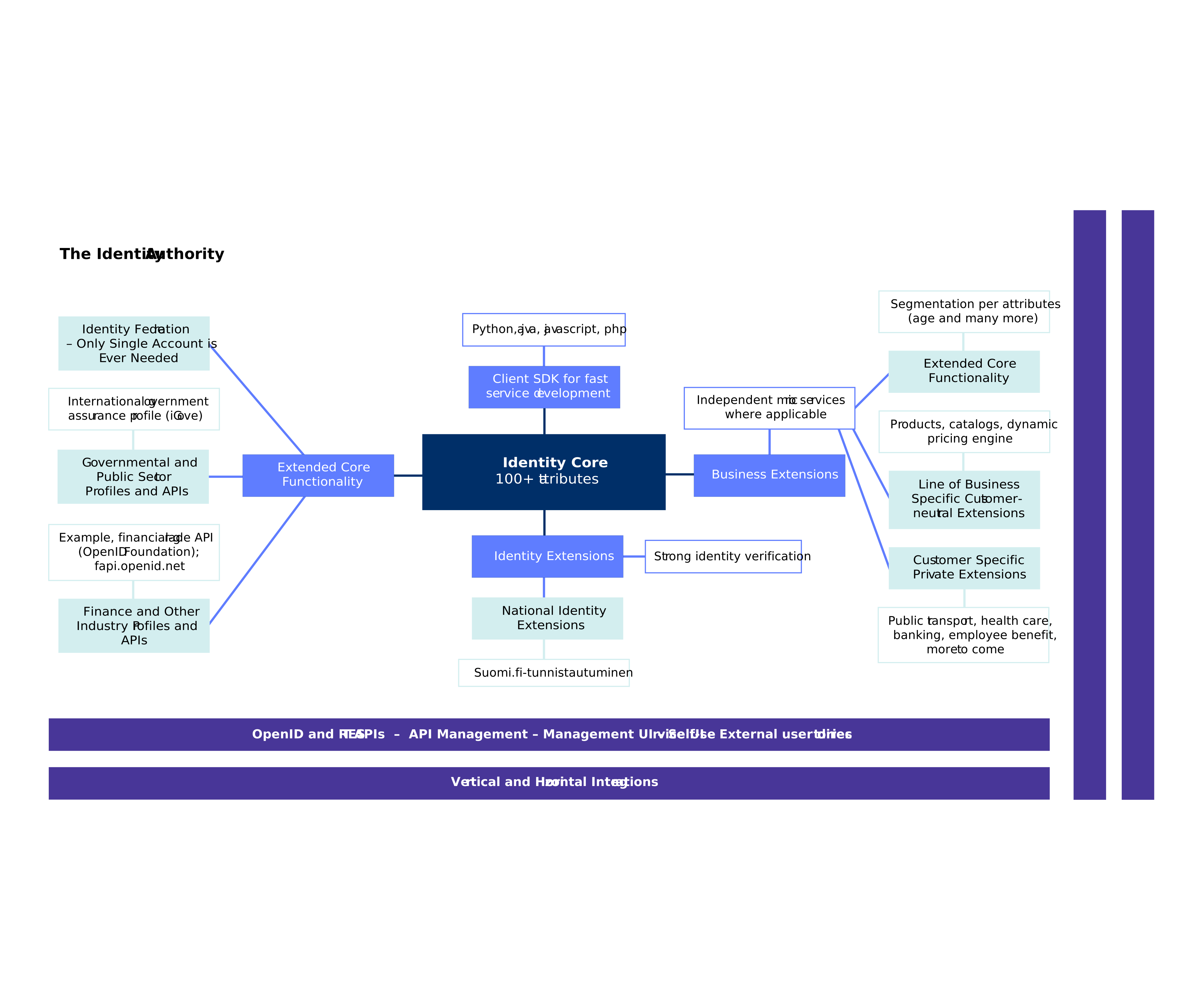
Trivore ID is designed to be extensible. In addition to core identity features, organisations can add business-specific modules and integrations to match their domain requirements.
Terms (quick glossary)
- User account: Primary security principal that can sign in and access services.
- Namespace (tenant): Isolated logical environment for an organisation's identities and data.
- Management API: REST-based integration API for administration and platform features.
- OpenID Connect (OIDC): Identity layer used for authentication and user identity assertions.
- OAuth 2.0: Authorization framework used for delegated access.
- Management UI (onePortal): Web UI used by administrators for managing the platform.
- Self-service UI: End-user-facing UI for account and profile management.
- Role-based access control (RBAC): Access model where permissions are grouped into roles.
- Permission (right): A specific allowed action, usually assigned through roles.
- Archive: Account is deactivated but recoverable data is retained.
- Purge: Permanent deletion after a prior archived state.
- MFA (multi-factor authentication): Additional factor beyond username and password for stronger authentication.
- IDaaS: Identity-as-a-Service delivery model.
- URI/URL/Path: Standard web addressing concepts used in endpoint definitions and links.
For feature-by-feature usage and configuration details, continue with the sections in this documentation site.