Suomi.fi-tunnistus IdP SAML Metadata Change
From time to time, the certificates behind Suomi.fi-tunnistus — the national-level strong identification service in Finland — are rotated, whether because they're expiring or because of a security improvement. When that happens, every Suomi.fi-tunnistus user directory needs its IdP SAML metadata updated to match.
DVV announces metadata changes to the [email protected] mailing list; see instructions for joining the list.
It's recommended to keep a separate, non-production namespace with its own Suomi.fi-tunnistus user directory, so this change can be tested, validated, and verified safely before touching any production namespace.
Process
This is usually a straightforward change, but when it also affects production, be careful and prepared to roll back if needed — the roll-back procedure is covered below.
Sign in to Trivore ID as a platform manager
You need the Platform Manager or Platform Administrator role, or at minimum permission to modify user directories in every affected namespace.
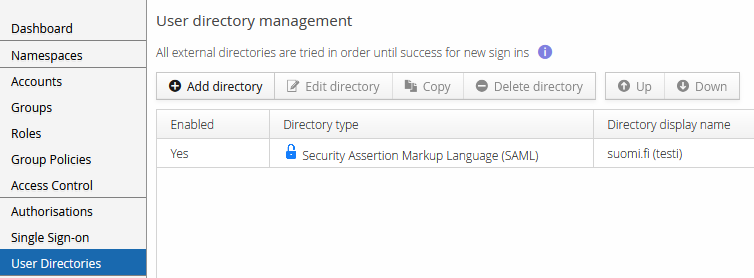
After signing in, locate the Suomi.fi-tunnistus user directory in each affected namespace — typically there are only a few. The term "suomi.fi" is usually part of its display name.
Prepare the files
Read DVV's change instructions carefully and note the relevant dates. Download the new metadata XML file and store it locally, with a filename that makes clear whether it's for test or production, and that it's the new metadata to switch to.
Back up the current metadata
Before making any change, save a local copy of the current metadata in case you need to roll back — again, name the file clearly as test or production, and as the metadata currently in use.
To back it up, open the user directory's editor by selecting it and clicking Edit Directory (shown in the screenshot above). The IdP metadata XML field is on the editor's first tab.
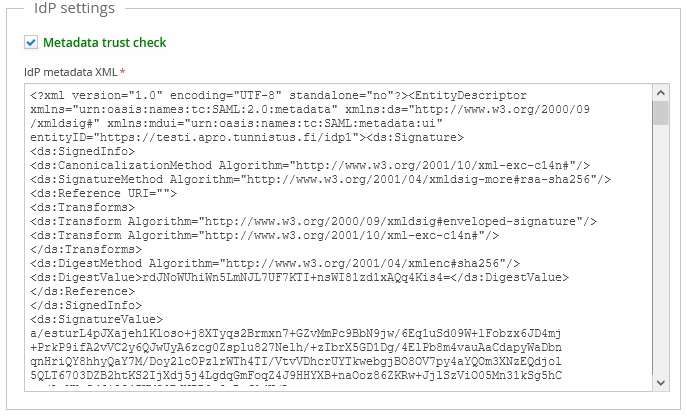
Click into the IdP metadata XML field, select all its content (Ctrl+A), copy it (Ctrl+C), and paste it into a text editor to save locally.
Replace the current metadata with the new one
- Clear the IdP metadata XML field so it's empty.
- Copy the new metadata from your text editor.
- Paste the new metadata into the IdP metadata XML field. If there's a problem with it, the field turns red with an error message — if that happens, use Revert rather than saving, so the user directory isn't left broken.
- Select Save, then Close.
The new metadata takes effect immediately once saved.
Verify it's working
There are many ways to verify the change; this covers just one of them.
Sign in to Trivore ID with a user account in a namespace where Suomi.fi-tunnistus is enabled and its metadata was just changed. This may require special arrangements in production, where this kind of sign-in is often disabled for most accounts and namespaces. After signing in, find Verify your identity on the Dashboard.
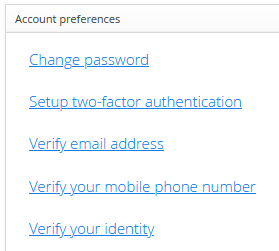
Select it, and confirm that Suomi.fi-tunnistus works as expected.
Additional external information
Previous metadata changes:
- 2022 — production: tunnistus.suomi.fi/static/metadata/idp-metadata.xml, test: static.apro.tunnistus.fi/static/metadata/idp-metadata.xml
- 2021 — announcement 1, announcement 2
The following are in Finnish only: