User Registration
New user registration is part of the OpenID Connect authentication process. As a user arrives in the sign-in UI, they may be given the option to register a new account. Depending on configuration, registration is done with an integrated form, or by linking to an external location where the registration flow can be more customised.
Registration enabling configuration
Registration is enabled in the OpenID Connect client editor.
The integrated registration form can be enabled by selecting a namespace new users are limited to, and allowing new user registration. The selected namespace must also have new user registration enabled.


The external registration form can be enabled by entering a "New user registration custom URL" and allowing new user registration.
Integrated registration form
The integrated registration form has fields selected in the namespace configuration. Field visibility, whether fields are required, and whether some of them are verified can all be configured there, in the Namespace editor → User registration tab.
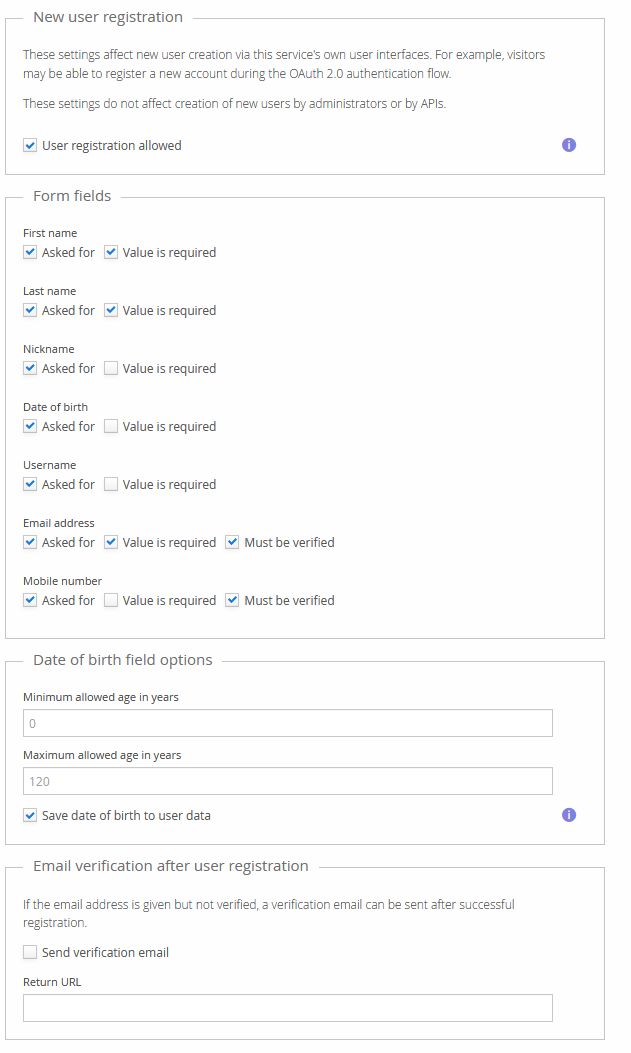
Some customer-specific modules may add custom components to the registration form; their configuration isn't documented here.
The registration flow has multiple steps:
- Enter basic information (name, email address, password, …).
- Verify entered information immediately, if so configured (email address, mobile number).
- Review details of the new user account.
- Sign in with the new account, which may have more interactive steps depending on configuration.
External registration form
The user is sent to the configured URL if the registration option is selected in the authentication UI. The following query parameters are added to the URL:
| Added query parameter | Value |
|---|---|
clientRedirectUri | The redirectUrl from the original authentication request. The form may want to redirect the user here later. |
clientName | The name of the OIDC client making the authentication request. |
locale | The current UI locale, in java.util.Locale.toString() format (for example, en or en_GB). |
Linking to registration
Normally, you should just link to the authentication URL with the normal OIDC parameters, and expect the user to click the "create a new account" feature if they don't have an account yet.
You can link directly to the registration form (integrated or external) by adding the query
parameter nur to the normal authentication URL. Opening the URL displays the registration view,
if it's available.
Note that all the usual authentication URL parameters are still required, since the registration flow ends by performing the normal authentication.