Email Address and Mobile Number Verification During Authentication
The sign-in view of the OpenID Connect authentication process can be configured to ask the user to verify their email address or mobile number before they're redirected to the client application.
Configuration
This enforcement of communication method verification can be configured in the OpenID Connect client editor with these options:
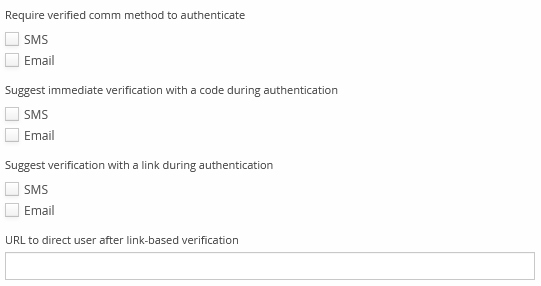
Require verified comm method to authenticate
If one of these options is selected and a user tries to sign in to your app without having the selected communication method already verified, they're asked to immediately verify it — they're sent a message with a verification code, and must enter it on screen. They can't continue to your app before they've verified all selected communication methods.
If the user doesn't have an email address or a mobile number, but it's required by this selection, the user can't sign in at all — the sign-in process doesn't currently let the user enter an address or number in this situation.
Suggest immediate verification with a code during authentication
If a user tries to authenticate and doesn't have the selected communication method verified yet, they're asked to verify it immediately with a code. They can optionally skip the verification.
Suggest verification with a link during authentication
If a user tries to authenticate and doesn't have the selected communication method verified yet, they're asked to verify it later with a code: they can choose to send themselves a message containing a verification link, or optionally skip the verification. Either way, the user can continue authentication before they've verified their communication method.
Because the link the user receives is opened in another browser window or tab, it would be unreasonable to ask them to return to the original browser tab afterward. This is why choosing verification with a link means the user can sign in to your app before their address or number is verified — it's up to your app to detect the verification state and act accordingly.
URL to direct user after link-based verification
If verification by link is used, the user is led to a page with a final "Continue" link, leading to the URL selected here — it should lead to your app. Your app should check the verification status of the user's communication methods using the UserInfo endpoint when the user opens this URL.