Last Activity
Trivore ID monitors the last time each user account was active, to help identify inactive users. This is used, for example, by features that lock or delete accounts that have been inactive too long.
Viewing the last activity time
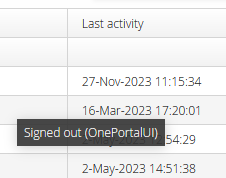
The last activity time is shown in the Management UI: open the Accounts view and check the Last activity column for the user.
Reading last activity via the REST API
GET /api/rest/v1/user/{userId}/last-activity
This requires the ACCOUNT_VIEW_LAST_ACTIVITY permission (or the user's own access token). The
response contains a timestamp, a human-readable description, and who or what caused it:
{
  "timestamp": "2024-08-15T10:22:16.752Z",
  "description": "Sign In",
  "actorId": "12345",
  "actorType": "ManagementApiClient"
}
Events which update last activity time
- The user account is first created.
- Successful authentication — for example, signing in to the Management UI, or interactive authentication to an OIDC client application via the Trivore ID sign-in UI.
- The UserInfo endpoint is called with the user's access token, either in the
Authorizationheader or as theaccess_tokenparameter. - Successful logout through the OIDC logout endpoint.
- Sign-out from the Management UI.
- Calls to the Management API with the user's access token in the
Authorizationheader.
Updating last activity manually via the REST API
Since last activity updates automatically whenever a user performs an action on this server, you normally don't need to set it yourself. But if your integration tracks activity that happens somewhere else — another system entirely — you can record it directly:
POST /api/rest/v1/user/{userId}/last-activity
with a JSON body of message (up to 200 characters, describing the activity, which may be
logged) and an optional timestamp. This requires the ACCOUNT_UPDATE_LAST_ACTIVITY permission
— setting a custom timestamp specifically (rather than defaulting to now) always requires it,
even when using the user's own access token.